 |
Peano
|
One step. More...
Public Member Functions | |
| __init__ (self, name, add_user_defined_actions=True) | |
| By default, the step generates at least one action set for the user. | |
| str | get_observer_class_name (self) |
| Class name of the observer this step is translated into. | |
| remove_all_actions (self) | |
| Each step holds a set of actions. | |
| add_action_set (self, action_set) | |
| Add a new action set to this mesh traversal step. | |
| set_project (self, project) | |
| Tie step to project. | |
| use_cell (self, submodel) | |
| use_face (self, submodel) | |
| use_vertex (self, submodel) | |
| highest_descend_invocation_order (self) | |
| Return max descend_invocation_order over all action sets associated with this step. | |
| lowest_descend_invocation_order (self) | |
| Return minimum descend_invocation_order over all action sets associated with this step. | |
| get_vertex_operations_signature (self) | |
| get_face_operations_signature (self) | |
| get_cell_operations_signature (self) | |
| get_touch_cell_signature (self) | |
| construct_output (self, output) | |
| Each solver step basically gives us two big files/classes: A class which handles the actual data movements, i.e. | |
| copy_action_sets_from_other_step (self, other_step) | |
Data Fields | |
| name = name | |
| list | cell_data = [] |
| list | face_data = [] |
| list | vertex_data = [] |
| dict | cell_data_access = {} |
| dict | face_data_access = {} |
| dict | vertex_data_access = {} |
| list | action_sets = [peano4.api.solversteps.UserActionSet(name)] |
| action_set_generator = StepToActionSets(self) | |
| observer_generator = StepToObserver(self) | |
| project = project | |
| namespace = project.namespace | |
| subdirectory = project.subdirectory | |
| temporary_subdirectory = project.temporary_subdirectory | |
Private Member Functions | |
| __sort (self) | |
| Simple bubble sort the action sets, such that their descend_invocation_order is preserved. | |
One step.
Most generic version of a solver step. A solverstep describes what Peano 4 should do when it runs over the grid. As users have to specify which pieces of data from the data model are used by the solver step, it can handle all the user data stack flow.
This class also is responsible to generate all function signatures of all the steps, observers and action sets. In the Peano terminology, a step corresponds to an observer. For any given step, we run through the mesh and pass the traversal automaton an observer which accepts events (aka state transition observations).
It is the observer's job to then distribute these observations, broken down into grid actions such as "touch vertex first time", among the action sets that are tied to this observer. In Python you can have one action set and associate it with several observers. In the C++ code, we will flatten such a relation, i.e. create the corresponding action set multiple times.
name: String This name is used to create the underlying action set later on
| peano4.api.solversteps.Step.Step.__init__ | ( | self, | |
| name, | |||
| add_user_defined_actions = True ) |
|
private |
Simple bubble sort the action sets, such that their descend_invocation_order is preserved.
Definition at line 98 of file Step.py.
References action_sets.
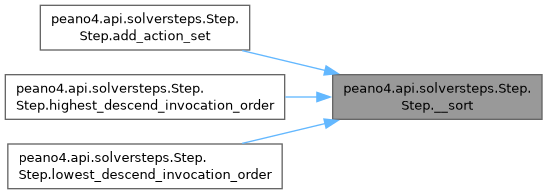
Referenced by add_action_set(), highest_descend_invocation_order(), and lowest_descend_invocation_order().
| peano4.api.solversteps.Step.Step.add_action_set | ( | self, | |
| action_set ) |
Add a new action set to this mesh traversal step.
Each step holds a set of action_sets. They describe what the step actually should do whenever it loads a vertex, runs into a cell, and so forth. By default, the step holds one user-defined action_set (UserActionSet) which means that a stub is generated where users can insert their functionality. It is important in which order you add your action_sets: The whole tree traversal is a top-down/depth-first tree traversal. So all the enter, create, ... operations of a action_set are invoked exactly in the order you add them to the step. All the delete, leave, ... operations are invokved in reversed order.
I used to have a flag append_at_end with the default True, but this one is now replaced, as each action set knows its priority.
Definition at line 117 of file Step.py.
References __sort(), and action_sets.

| peano4.api.solversteps.Step.Step.construct_output | ( | self, | |
| output ) |
Each solver step basically gives us two big files/classes: A class which handles the actual data movements, i.e.
is an implementation of the tree visitor pattern over the Peano4 tree. The other type is an interface which provides plugin points into the created data transitions from a user's perspective.
Markers of type peano4.api.solversteps.SynchroniseActionSets.SynchroniseActionSets yield no C++ code. They only separate the task groups which we hand over to the observer (peano4.api.solversteps.SynchroniseActionSets.get_task_groups()).
Definition at line 246 of file Step.py.
References action_set_generator, action_sets, construct_output(), and observer_generator.
Referenced by construct_output().
| peano4.api.solversteps.Step.Step.copy_action_sets_from_other_step | ( | self, | |
| other_step ) |
Definition at line 278 of file Step.py.
References action_sets.
| peano4.api.solversteps.Step.Step.get_cell_operations_signature | ( | self | ) |
Definition at line 212 of file Step.py.
References peano4.api.datamodel.Model.Model.cell_data, cell_data, peano4.api.datamodel.Model.Model.face_data, face_data, peano4.api.datamodel.Model.Model.vertex_data, and vertex_data.
| peano4.api.solversteps.Step.Step.get_face_operations_signature | ( | self | ) |
Definition at line 198 of file Step.py.
References peano4.api.datamodel.Model.Model.cell_data, cell_data, peano4.api.datamodel.Model.Model.face_data, face_data, peano4.api.datamodel.Model.Model.vertex_data, and vertex_data.
| str peano4.api.solversteps.Step.Step.get_observer_class_name | ( | self | ) |
Class name of the observer this step is translated into.
This is the step's name, cut down to 64 characters plus a consecutive number if it is longer (
Definition at line 72 of file Step.py.
References convert::data::Variable.name, exagrype.api.euler.CCZ4WithEuler_OuterAdditiveCoupling.CCZ4WithEuler_OuterAdditiveCoupling.name, exagrype.api.euler.CCZ4WithEuler_OuterMultiplicativeCoupling.CCZ4WithEuler_OuterMultiplicativeCoupling.name, exagrype.api.FOSOSolver.FOSOSolver.name, exagrype.api.scalarfield.CCZ4WithScalarField_InnerCoupling.CCZ4WithScalarField_InnerCoupling.name, exagrype.api.scalarfield.CCZ4WithScalarField_OuterMultiplicativeCoupling.CCZ4WithScalarField_OuterMultiplicativeCoupling.name, exahype2.api.dslhype2.AbstractSyntaxTree.Argument.name, exahype2.api.dslhype2.AbstractSyntaxTree.Function.name, exahype2.api.dslhype2.AbstractSyntaxTree.FunctionCall.name, exahype2.api.dslhype2.Expressions.Variable.name, exahype2.api.dslhype2.Types.TFunction.name, exahype2.api.dslhype2.Types.TStruct.name, exahype2.api.PDETerm.PDETerm.name, exahype2.api.Solver.Solver.Plotter.name, exaparty.api.particle.AlgorithmStep.AlgorithmStep.name, peano4.api.datamodel.DoF.DoF.name, and name.
| peano4.api.solversteps.Step.Step.get_touch_cell_signature | ( | self | ) |
Definition at line 228 of file Step.py.
References peano4.api.datamodel.Model.Model.cell_data, cell_data, peano4.api.datamodel.Model.Model.face_data, face_data, peano4.api.datamodel.Model.Model.vertex_data, and vertex_data.
| peano4.api.solversteps.Step.Step.get_vertex_operations_signature | ( | self | ) |
Definition at line 186 of file Step.py.
References peano4.api.datamodel.Model.Model.cell_data, cell_data, peano4.api.datamodel.Model.Model.face_data, face_data, peano4.api.datamodel.Model.Model.vertex_data, and vertex_data.
| peano4.api.solversteps.Step.Step.highest_descend_invocation_order | ( | self | ) |
Return max descend_invocation_order over all action sets associated with this step.
Definition at line 160 of file Step.py.
References __sort(), and action_sets.

| peano4.api.solversteps.Step.Step.lowest_descend_invocation_order | ( | self | ) |
Return minimum descend_invocation_order over all action sets associated with this step.
Definition at line 173 of file Step.py.
References __sort(), and action_sets.

| peano4.api.solversteps.Step.Step.remove_all_actions | ( | self | ) |
Each step holds a set of actions.
They describe what the step actually should do whenever it loads a vertex, runs into a cell, and so forth. By default, the step holds one user-defined actions which means that a stub is generated where users can insert their functionality. You can remove this one (or any other one added so far) with this routine.
Definition at line 88 of file Step.py.
References action_sets.
| peano4.api.solversteps.Step.Step.set_project | ( | self, | |
| project ) |
| peano4.api.solversteps.Step.Step.use_cell | ( | self, | |
| submodel ) |
Definition at line 151 of file Step.py.
References peano4.api.datamodel.Model.Model.cell_data, and cell_data.
| peano4.api.solversteps.Step.Step.use_face | ( | self, | |
| submodel ) |
Definition at line 154 of file Step.py.
References peano4.api.datamodel.Model.Model.face_data, and face_data.
| peano4.api.solversteps.Step.Step.use_vertex | ( | self, | |
| submodel ) |
Definition at line 157 of file Step.py.
References peano4.api.datamodel.Model.Model.vertex_data, and vertex_data.
| peano4.api.solversteps.Step.Step.action_set_generator = StepToActionSets(self) |
Definition at line 69 of file Step.py.
Referenced by construct_output().
| peano4.api.solversteps.Step.Step.action_sets = [peano4.api.solversteps.UserActionSet(name)] |
Definition at line 66 of file Step.py.
Referenced by __sort(), add_action_set(), peano4.api.taskgraph.Task.Task.add_action_set(), construct_output(), copy_action_sets_from_other_step(), highest_descend_invocation_order(), lowest_descend_invocation_order(), and remove_all_actions().
| list peano4.api.solversteps.Step.Step.cell_data = [] |
Definition at line 49 of file Step.py.
Referenced by tarch.plotter.api.input.PatchFileParser.UnknownAttributes.append_patch(), get_cell_operations_signature(), get_face_operations_signature(), get_touch_cell_signature(), get_vertex_operations_signature(), tarch.plotter.api.input.PatchFileParser.UnknownAttributes.set_celldata(), use_cell(), and peano4.api.taskgraph.Task.Task.use_cell().
| dict peano4.api.solversteps.Step.Step.cell_data_access = {} |
Definition at line 62 of file Step.py.
Referenced by peano4.api.taskgraph.Task.Task.use_cell().
| list peano4.api.solversteps.Step.Step.face_data = [] |
Definition at line 50 of file Step.py.
Referenced by get_cell_operations_signature(), get_face_operations_signature(), get_touch_cell_signature(), get_vertex_operations_signature(), use_face(), and peano4.api.taskgraph.Task.Task.use_face().
| dict peano4.api.solversteps.Step.Step.face_data_access = {} |
Definition at line 63 of file Step.py.
Referenced by peano4.api.taskgraph.Task.Task.use_face().
| peano4.api.solversteps.Step.Step.name = name |
Definition at line 48 of file Step.py.
Referenced by solvers.aderdg.kernels.Gemms.Gemms.__init__(), solvers.aderdg.kernels.Gemms.Gemms.__repr__(), test_derive_load_store_compute_flag._FakeSubmodel.__repr__(), test_propagate_use_statements._FakeSubmodel.__repr__(), exagrype.api.CCZ4SolverBase.CCZ4SolverBase._insert_constraint_enforcement(), exagrype.api.CCZ4SolverBase.CCZ4SolverBase._tasks_of_this_solver(), exagrype.api.FOSOReconstructionSolver.FOSOReconstructionSolver.create_task_graph(), peano4.api.solversteps.UserActionSet.UserActionSet.get_action_set_name(), peano4.api.taskgraph.compiler.fuse-steps-illustrations._IllustrationActionSet.get_action_set_name(), test_fuse_steps._FakeActionSet.get_action_set_name(), get_observer_class_name(), and dastgen2.attributes.Enumeration.Enumeration.get_to_string().
| peano4.api.solversteps.Step.Step.namespace = project.namespace |
| peano4.api.solversteps.Step.Step.observer_generator = StepToObserver(self) |
Definition at line 70 of file Step.py.
Referenced by construct_output().
| peano4.api.solversteps.Step.Step.subdirectory = project.subdirectory |
| peano4.api.solversteps.Step.Step.temporary_subdirectory = project.temporary_subdirectory |
| list peano4.api.solversteps.Step.Step.vertex_data = [] |
Definition at line 51 of file Step.py.
Referenced by get_cell_operations_signature(), get_face_operations_signature(), get_touch_cell_signature(), get_vertex_operations_signature(), use_vertex(), and peano4.api.taskgraph.Task.Task.use_vertex().
| dict peano4.api.solversteps.Step.Step.vertex_data_access = {} |
Definition at line 64 of file Step.py.
Referenced by peano4.api.taskgraph.Task.Task.use_vertex().
 1.15.0