 |
Peano
|
Plotting counterpart to RusanovWithExplicitEuler: maps the patch data of a Finite Volume scheme with a Rusanov Riemann solver, realised over a block-structured mesh, onto a plot mesh and writes it out as a VTK file. More...
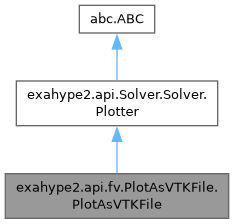
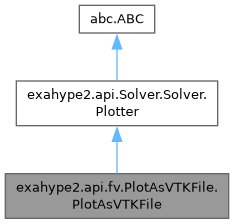
Public Member Functions | |
| __init__ (self, Solver solver, first_plot_time_stamp=0.0, time_in_between_plots=0.1, plotter_precision=5, output_path=".", filename="solution", str name=None, quantities=None, binary=True) | |
| output_file_prefix (self) | |
| Prefix of the files the plotter writes, including the path. | |
| add_plot_filter (self, offset, size, frequency=1) | |
| Add a new filter to Peano/ExaHyPE. | |
| construct_output (self, exahype2_project, peano_project, plot) | |
| Add one task to the plot graph which writes the solver's patches. | |
| Public Member Functions inherited from exahype2.api.Solver.Solver.Plotter | |
| __init__ (self, "Solver" solver, str name=None) | |
| str | create_is_active_predicate (self) |
| C++ predicate which holds if the plotter is active. | |
| str | create_finish_call (self) |
| C++ statement which moves the plotter on to its next output. | |
Protected Member Functions | |
| _log_plot_graph (self, plot) | |
| _create_selected_entries (self) | |
| Indices of the entries of Q which are written, or None for all of them. | |
| _create_description (self) | |
| Comma-separated names of the entries which are written, or the solver's unknown identifier if its variables carry no names. | |
| _create_guard (self) | |
| Guard of the cells which are plotted. | |
| Protected Member Functions inherited from exahype2.api.Solver.Solver.Plotter | |
| _add_time_interval_bookkeeping_to_solver (self, float first_time_stamp, float time_in_between) | |
| Make the plotter active in regular time intervals. | |
Protected Attributes | |
| _first_plot_time_stamp = first_plot_time_stamp | |
| _time_in_between_plots = time_in_between_plots | |
| _plotter_precision = plotter_precision | |
| list | _plot_filters = [] |
| _output_path = output_path | |
| _filename = filename | |
| _quantities = quantities | |
| _binary = binary | |
| Protected Attributes inherited from exahype2.api.Solver.Solver.Plotter | |
| _solver = solver | |
Additional Inherited Members | |
| Data Fields inherited from exahype2.api.Solver.Solver.Plotter | |
| name = name | |
Plotting counterpart to RusanovWithExplicitEuler: maps the patch data of a Finite Volume scheme with a Rusanov Riemann solver, realised over a block-structured mesh, onto a plot mesh and writes it out as a VTK file.
The plotter is active in regular time intervals (exahype2.api.Solver.Solver.Plotter): It is active as soon as the solver's min time stamp has reached the time stamp of its next plot. After each plot, this time stamp is incremented by time_in_between_plots. A solver can have several plotters, e.g. two PlotAsVTKFile plotters with different plot intervals and filters, as long as they write into different files.
If the solver's variables carry names, the plotter writes them as comma-separated list into the description of the output files (exahype2.api.Solver.Solver.variable_names_per_entry()). Paraview then shows them in the name of the data array, and tarch.plotter.api.notebook.show_solution() uses them to label the unknowns. Otherwise, the description is the solver's unknown identifier.
Definition at line 47 of file PlotAsVTKFile.py.
| exahype2.api.fv.PlotAsVTKFile.PlotAsVTKFile.__init__ | ( | self, | |
| Solver | solver, | ||
| first_plot_time_stamp = 0.0, | |||
| time_in_between_plots = 0.1, | |||
| plotter_precision = 5, | |||
| output_path = ".", | |||
| filename = "solution", | |||
| str | name = None, | ||
| quantities = None, | |||
| binary = True ) |
| solver | exahype2.api.Solver The solver whose solution is plotted. |
| first_plot_time_stamp | float Time stamp of the first plot. |
| time_in_between_plots | float Has to be positive. If you don't want to have any plots for a solver, don't give it a plotter. |
| plotter_precision | int Number of significant digits written per value. Has to be positive. |
| output_path | str Directory the plot files are written into. |
| filename | str The plot files are called filename-SolverName. Plotters of the same solver have to use different file names or output paths. |
| name | str or None Name of the plotter (exahype2.api.Solver.Solver.Plotter). |
| quantities | List[str or int] or None The entries of Q which are written per volume. A string is the name of a variable as passed to the solver and selects all of its entries, an int is the index of one entry of Q. The auxiliary variables are written into files of their own (exahype2.api.Quantities.resolve_quantities()). None writes all entries. |
| binary | bool Write the values as raw doubles instead of text (tarch.plotter.griddata.blockstructured.PeanoBinaryPatchFileWriter). The files are smaller and the values bit-exact, and the plotter's precision then only affects the patch offsets and sizes. The Python scripts of tarch.plotter.api read both formats. Pass False to get human-readable files. |
Definition at line 71 of file PlotAsVTKFile.py.
References __init__().
Referenced by __init__().
|
protected |
Comma-separated names of the entries which are written, or the solver's unknown identifier if its variables carry no names.
Definition at line 273 of file PlotAsVTKFile.py.
References _create_selected_entries(), exagrype.api.FD4WithKODissipation.FD4WithKODissipation._solver, exahype2.api.blockstructured.AdaptMeshAndBalanceLoad.AdaptMeshAndBalanceLoad._solver, exahype2.api.blockstructured.ConsumeRefinementRequests.ConsumeRefinementRequests._solver, exahype2.api.blockstructured.DynamicMeshRefinement.DynamicMeshRefinement._solver, exahype2.api.blockstructured.LoadCheckpoint._LoadPatchesFromCheckpoint._solver, exahype2.api.blockstructured.LoadCheckpoint.LoadCheckpoint._solver, exahype2.api.fv.actionsets.AbstractFVActionSet.AbstractFVActionSet._solver, exahype2.api.fv.actionsets.ApplyDirichletBoundaryConditions.ApplyDirichletBoundaryConditions._solver, exahype2.api.fv.actionsets.DiscardPatchInterior.DiscardPatchInterior._solver, exahype2.api.fv.AdaptMeshAndBalanceLoad.AdaptMeshAndBalanceLoad._solver, and _solver.

|
protected |
Guard of the cells which are plotted.
The guard is built directly from self._plot_filters (known here, in Python) rather than delegating to some project-wide C++ filter object: the generated code carries the exact offset/size values this plotter was configured with, and nothing else. Only the cells selected by the solver's grid selector are plotted, as only those are updated (exahype2.api.fv.actionsets.UpdateCell). Other cells would hold outdated data overlapping the actual solution.
Definition at line 288 of file PlotAsVTKFile.py.
References _plot_filters, exagrype.api.FD4WithKODissipation.FD4WithKODissipation._solver, exahype2.api.blockstructured.AdaptMeshAndBalanceLoad.AdaptMeshAndBalanceLoad._solver, exahype2.api.blockstructured.ConsumeRefinementRequests.ConsumeRefinementRequests._solver, exahype2.api.blockstructured.DynamicMeshRefinement.DynamicMeshRefinement._solver, exahype2.api.blockstructured.LoadCheckpoint._LoadPatchesFromCheckpoint._solver, exahype2.api.blockstructured.LoadCheckpoint.LoadCheckpoint._solver, exahype2.api.fv.actionsets.AbstractFVActionSet.AbstractFVActionSet._solver, exahype2.api.fv.actionsets.ApplyDirichletBoundaryConditions.ApplyDirichletBoundaryConditions._solver, exahype2.api.fv.actionsets.DiscardPatchInterior.DiscardPatchInterior._solver, exahype2.api.fv.AdaptMeshAndBalanceLoad.AdaptMeshAndBalanceLoad._solver, and _solver.
|
protected |
Indices of the entries of Q which are written, or None for all of them.
Definition at line 262 of file PlotAsVTKFile.py.
References _quantities, exagrype.api.FD4WithKODissipation.FD4WithKODissipation._solver, exahype2.api.blockstructured.AdaptMeshAndBalanceLoad.AdaptMeshAndBalanceLoad._solver, exahype2.api.blockstructured.ConsumeRefinementRequests.ConsumeRefinementRequests._solver, exahype2.api.blockstructured.DynamicMeshRefinement.DynamicMeshRefinement._solver, exahype2.api.blockstructured.LoadCheckpoint._LoadPatchesFromCheckpoint._solver, exahype2.api.blockstructured.LoadCheckpoint.LoadCheckpoint._solver, exahype2.api.fv.actionsets.AbstractFVActionSet.AbstractFVActionSet._solver, exahype2.api.fv.actionsets.ApplyDirichletBoundaryConditions.ApplyDirichletBoundaryConditions._solver, exahype2.api.fv.actionsets.DiscardPatchInterior.DiscardPatchInterior._solver, exahype2.api.fv.AdaptMeshAndBalanceLoad.AdaptMeshAndBalanceLoad._solver, and _solver.
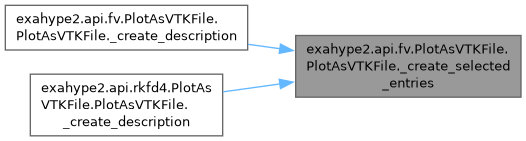
Referenced by _create_description(), and exahype2.api.rkfd4.PlotAsVTKFile.PlotAsVTKFile._create_description().
|
protected |
Definition at line 256 of file PlotAsVTKFile.py.
References exagrype.api.FD4WithKODissipation.FD4WithKODissipation._solver, exahype2.api.blockstructured.AdaptMeshAndBalanceLoad.AdaptMeshAndBalanceLoad._solver, exahype2.api.blockstructured.ConsumeRefinementRequests.ConsumeRefinementRequests._solver, exahype2.api.blockstructured.DynamicMeshRefinement.DynamicMeshRefinement._solver, exahype2.api.blockstructured.LoadCheckpoint._LoadPatchesFromCheckpoint._solver, exahype2.api.blockstructured.LoadCheckpoint.LoadCheckpoint._solver, exahype2.api.fv.actionsets.AbstractFVActionSet.AbstractFVActionSet._solver, exahype2.api.fv.actionsets.ApplyDirichletBoundaryConditions.ApplyDirichletBoundaryConditions._solver, exahype2.api.fv.actionsets.DiscardPatchInterior.DiscardPatchInterior._solver, exahype2.api.fv.AdaptMeshAndBalanceLoad.AdaptMeshAndBalanceLoad._solver, and _solver.
| exahype2.api.fv.PlotAsVTKFile.PlotAsVTKFile.add_plot_filter | ( | self, | |
| offset, | |||
| size, | |||
| frequency = 1 ) |
Add a new filter to Peano/ExaHyPE.
Restrict plotting to patches overlapping a given box. Filters are baked directly into the guard of the generated plot action set (see construct_output()), i.e. the generated C++ code evaluates the exact offset/size this filter was constructed with - it never consults any project-wide, separately configured filter object.
| offset | (float,float,float) |
| size | (float,float,float) |
| frequency | int A positive value. Peano makes snapshots every dt simulation units. This is something you specify once per simulation. But you might decide only to splot every k of these snapshots. |
Definition at line 144 of file PlotAsVTKFile.py.
References _plot_filters.
| exahype2.api.fv.PlotAsVTKFile.PlotAsVTKFile.construct_output | ( | self, | |
| exahype2_project, | |||
| peano_project, | |||
| plot ) |
Add one task to the plot graph which writes the solver's patches.
Reimplemented from exahype2.api.Solver.Solver.Plotter.
Definition at line 176 of file PlotAsVTKFile.py.
| exahype2.api.fv.PlotAsVTKFile.PlotAsVTKFile.output_file_prefix | ( | self | ) |
Prefix of the files the plotter writes, including the path.
The solver uses it to ensure that no two plotters write into the same files. Plotters which write no files return None.
Reimplemented from exahype2.api.Solver.Solver.Plotter.
Definition at line 141 of file PlotAsVTKFile.py.
References exahype2.api.blockstructured.LoadCheckpoint.LoadCheckpoint._filename, exahype2.api.dslhype.SyntaxTree.LogDataBlock._filename, _filename, exahype2.api.blockstructured.LoadCheckpoint.LoadCheckpoint._output_path, _output_path, exagrype.api.FD4WithKODissipation.FD4WithKODissipation._solver, exahype2.api.blockstructured.AdaptMeshAndBalanceLoad.AdaptMeshAndBalanceLoad._solver, exahype2.api.blockstructured.ConsumeRefinementRequests.ConsumeRefinementRequests._solver, exahype2.api.blockstructured.DynamicMeshRefinement.DynamicMeshRefinement._solver, exahype2.api.blockstructured.LoadCheckpoint._LoadPatchesFromCheckpoint._solver, exahype2.api.blockstructured.LoadCheckpoint.LoadCheckpoint._solver, exahype2.api.fv.actionsets.AbstractFVActionSet.AbstractFVActionSet._solver, exahype2.api.fv.actionsets.ApplyDirichletBoundaryConditions.ApplyDirichletBoundaryConditions._solver, exahype2.api.fv.actionsets.DiscardPatchInterior.DiscardPatchInterior._solver, exahype2.api.fv.AdaptMeshAndBalanceLoad.AdaptMeshAndBalanceLoad._solver, and _solver.
|
protected |
Definition at line 139 of file PlotAsVTKFile.py.
|
protected |
Definition at line 137 of file PlotAsVTKFile.py.
Referenced by tracer.InsertParticlesFromFile.InsertParticlesFromFile.get_constructor_body(), output_file_prefix(), exahype2.api.fv.WriteCheckpoint.WriteCheckpoint.output_file_prefix(), exahype2.api.rkfd4.PlotAsVTKFile.PlotAsVTKFile.output_file_prefix(), and exahype2.api.rkfd4.WriteCheckpoint.WriteCheckpoint.output_file_prefix().
|
protected |
Definition at line 132 of file PlotAsVTKFile.py.
Referenced by exaparty.api.Project.Project.__export_constants(), and exaparty.api.Project.Project.set_global_simulation_parameters().
|
protected |
Definition at line 136 of file PlotAsVTKFile.py.
Referenced by api.Project.Project.__init__(), output_file_prefix(), exahype2.api.fv.WriteCheckpoint.WriteCheckpoint.output_file_prefix(), exahype2.api.rkfd4.PlotAsVTKFile.PlotAsVTKFile.output_file_prefix(), exahype2.api.rkfd4.WriteCheckpoint.WriteCheckpoint.output_file_prefix(), api.Project.Project.set_output_path(), exahype2.api.Project.Project.set_output_path(), and exaparty.api.Project.Project.set_output_path().
|
protected |
Definition at line 135 of file PlotAsVTKFile.py.
Referenced by _create_guard(), exahype2.api.rkfd4.PlotAsVTKFile.PlotAsVTKFile._create_guard(), add_plot_filter(), and exahype2.api.rkfd4.PlotAsVTKFile.PlotAsVTKFile.add_plot_filter().
|
protected |
Definition at line 134 of file PlotAsVTKFile.py.
Referenced by api.Project.Project.__export_constants(), api.Project.Project.set_global_simulation_parameters(), and exaparty.api.Project.Project.set_global_simulation_parameters().
|
protected |
Definition at line 138 of file PlotAsVTKFile.py.
Referenced by _create_selected_entries(), and exahype2.api.rkfd4.PlotAsVTKFile.PlotAsVTKFile._create_selected_entries().
|
protected |
Definition at line 133 of file PlotAsVTKFile.py.
Referenced by exaparty.api.Project.Project.__export_constants(), and exaparty.api.Project.Project.set_global_simulation_parameters().
 1.15.0