 |
Peano
|
Holds a sequence of Task instances. More...
Public Member Functions | |
| __init__ (self) | |
| add_task (self, Task task) | |
| append (self, "Graph" other) | |
| Concatenate another graph behind this one. | |
| merge (self, "Graph" other) | |
| Add all tasks of another graph to this graph, next to the existing ones. | |
| List[Task] | find_tasks (self, *tags) |
| Return all tasks of this graph which carry at least one of the tags, in the order in which they have been added to the graph. | |
| List[Task] | source_tasks (self) |
| Return all tasks which depend on no other task of this graph. | |
| List[Task] | sink_tasks (self) |
| Return all tasks which no other task of this graph depends on. | |
| insert_after (self, Union[Task, List[Task]] anchors, Task task) | |
| Insert a task directly after one or several anchors. | |
| List[Task] | ordered_tasks (self) |
| Linearise this graph's tasks into the order peano4.api.taskgraph.compiler.Sequential.translate() compiles them into: a straightforward recursive traversal of the dependency DAG (visit a task's dependencies before the task itself), which - since every dependency is visited before whatever depends on it - yields a valid topological order. | |
| List[Task] | anchored_end_of_step_tasks (self) |
| End-of-step tasks which do not run at the very end of the step. | |
| log_as_text (self, str title="Task graph") | |
| Textual counterpart to visualise(): logs a plain-text rendering of this task graph through peano4.api.Logger(), for LoggerVerbosity.TEXT runs, where a matplotlib window is neither wanted nor - in a batch/ non-interactive run - even possible. | |
| visualise (self, str title="Task graph") | |
| Render this task graph with matplotlib as a UML state diagram: one rounded-rectangle state per task, a solid transition arrow from every dependency to the task that depends on it. | |
Data Fields | |
| list | tasks = [] |
Static Protected Member Functions | |
| bool | _depends_on (Task task, Task other) |
| True if task depends on other, directly or indirectly. | |
True if task depends on other, directly or indirectly.
Definition at line 195 of file Graph.py.
Referenced by insert_after().

| peano4.api.taskgraph.Graph.Graph.add_task | ( | self, | |
| Task | task ) |
Definition at line 19 of file Graph.py.
References append(), and tasks.
Referenced by insert_after().


| List[Task] peano4.api.taskgraph.Graph.Graph.anchored_end_of_step_tasks | ( | self | ) |
End-of-step tasks which do not run at the very end of the step.
A GLOBAL_END_OF_STEP task runs last in the last traversal. If another task depends on it, this cannot hold: The task has to finish its traversal first, and the dependent task then runs in a later one. Such a task thus ends the traversal of its last dependency instead (peano4.api.taskgraph.compiler.FuseSteps.translate()). The same holds for each end-of-step task which such a task depends on in turn.
Definition at line 267 of file Graph.py.
References tasks.
Referenced by ordered_tasks().

| peano4.api.taskgraph.Graph.Graph.append | ( | self, | |
| "Graph" | other ) |
Concatenate another graph behind this one.
The end of this graph is connected to the start of the other one: Every task of the other graph that depends on nothing within the other graph (its sources) additionally depends on every task of this graph that no other task of this graph depends on (its sinks, sink_tasks()). If a sink is a global task, the sources of the other graph depend on it, and the task compiler does not fuse them into its mesh sweep (peano4.api.taskgraph.Task.Task.GridEntity). All tasks of both graphs are kept, with their own dependencies, and none is dropped or merged, even if the two graphs do the same work in parts. Removing such redundancy is up to the caller. The other graph remains untouched, but shares its task objects with this one.
Use merge() to put two graphs next to each other instead.
| other | peano4.api.taskgraph.Graph The graph that follows this one. |
Definition at line 22 of file Graph.py.
References sink_tasks(), and tasks.
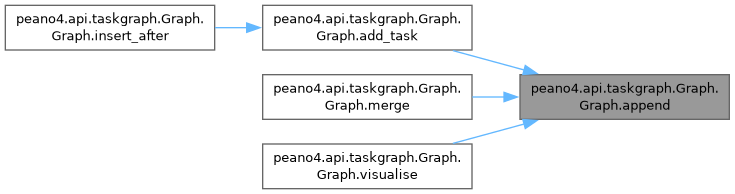
Referenced by add_task(), merge(), and visualise().

| List[Task] peano4.api.taskgraph.Graph.Graph.find_tasks | ( | self, | |
| * | tags ) |
Return all tasks of this graph which carry at least one of the tags, in the order in which they have been added to the graph.
A task which carries several of the tags is returned only once.
| tags | str One or several tags, i.e. strings which the tasks hold in their set tags (peano4.api.taskgraph.Task.Task). |
Definition at line 86 of file Graph.py.
References tasks.
Insert a task directly after one or several anchors.
The routine adds task to the graph and makes it depend on all anchors. All tasks which have depended on any of the anchors so far depend on task instead. Consequently, task runs after the anchors but before anything that used to follow them.
Use this routine to add a step to a task graph which someone else has built, e.g. to postprocess the outcome of a task. task should not depend on any other task yet, unless these dependencies run before the anchors anyway.
Pass several anchors if several tasks produce one outcome together. The optimistic Finite Volumes, for example, write the new solution either in one task or in another, depending on the cell. A single task inserted after both runs once per cell, after whichever of the two has updated this cell. The anchors must not depend on each other, neither directly nor indirectly, as the redirection would create a cycle otherwise.
| anchors | peano4.api.taskgraph.Task or List[peano4.api.taskgraph.Task] One task or a list of tasks of this graph. |
| task | peano4.api.taskgraph.Task The new task. It must not be part of the graph yet. |
Definition at line 137 of file Graph.py.
References _depends_on(), add_task(), and tasks.

| peano4.api.taskgraph.Graph.Graph.log_as_text | ( | self, | |
| str | title = "Task graph" ) |
Textual counterpart to visualise(): logs a plain-text rendering of this task graph through peano4.api.Logger(), for LoggerVerbosity.TEXT runs, where a matplotlib window is neither wanted nor - in a batch/ non-interactive run - even possible.
Renders the same information visualise() draws as a UML state diagram - every task's grid entity, its dependencies, its action sets (as "do / <name>" lines), the cell/face/vertex submodels it declares via use_cell()/use_face()/use_vertex() (each annotated with its Task.DataAccess qualifier) and whether it repeats - as one block of text per task, ordered root to sink by dependency depth exactly like visualise() lays its layers out top to bottom.
Definition at line 302 of file Graph.py.
References tasks.
| peano4.api.taskgraph.Graph.Graph.merge | ( | self, | |
| "Graph" | other ) |
Add all tasks of another graph to this graph, next to the existing ones.
The tasks keep their dependencies, i.e. the result is the union of the two graphs: they run independently of each other unless the caller adds the dependencies that connect them. The other graph remains untouched and shares its task objects with this one. A task which both graphs hold is added only once.
This is how a host that couples several solvers (Coupling different solvers) puts the task graphs side by side which the solvers have built independently, before it wires them. Use append() to run one graph after the other.
| other | peano4.api.taskgraph.Graph The graph whose tasks are added. |
Definition at line 62 of file Graph.py.
References append(), and tasks.

| List[Task] peano4.api.taskgraph.Graph.Graph.ordered_tasks | ( | self | ) |
Linearise this graph's tasks into the order peano4.api.taskgraph.compiler.Sequential.translate() compiles them into: a straightforward recursive traversal of the dependency DAG (visit a task's dependencies before the task itself), which - since every dependency is visited before whatever depends on it - yields a valid topological order.
This is the single source of truth for "the task after this one" that both translate() and peano4.api.taskgraph.compiler.PropagateUseStatements.propagate_use_statements() rely on; they must agree on the same order, since the latter's whole job is to reason about which task's Observer immediately follows which other one's once compiled.
Repeated calls recompute the order from scratch (cheap - task graphs here are small) rather than caching it, so adding further tasks/dependencies after an earlier call is always reflected.
Tasks of the kind GLOBAL_START_OF_STEP come first, as they may not depend on other tasks. Tasks of the kind GLOBAL_END_OF_STEP come last (peano4.api.taskgraph.Task.Task.GridEntity), with one exception: If another task depends on them (anchored_end_of_step_tasks()), they end the traversal of their last dependency and keep their place among the other tasks. Within each of the three parts, the order is the one of the traversal.
Definition at line 208 of file Graph.py.
References anchored_end_of_step_tasks(), and tasks.

| List[Task] peano4.api.taskgraph.Graph.Graph.sink_tasks | ( | self | ) |
Return all tasks which no other task of this graph depends on.
These are the last tasks of the graph. A graph that forks, e.g. because two solvers each add their own chain of tasks, has more than one of them. Make a task depend on all of them to run it after the whole graph, e.g. to synchronise the solvers (Coupling different solvers). The tasks are returned in the order in which they have been added to the graph.
Definition at line 118 of file Graph.py.
References tasks.
Referenced by append().

| List[Task] peano4.api.taskgraph.Graph.Graph.source_tasks | ( | self | ) |
Return all tasks which depend on no other task of this graph.
These are the first tasks of the graph, i.e. the counterpart of sink_tasks(). Dependencies on tasks outside of the graph are ignored. The tasks are returned in the order in which they have been added to the graph.
Definition at line 101 of file Graph.py.
References tasks.
| peano4.api.taskgraph.Graph.Graph.visualise | ( | self, | |
| str | title = "Task graph" ) |
Render this task graph with matplotlib as a UML state diagram: one rounded-rectangle state per task, a solid transition arrow from every dependency to the task that depends on it.
Tasks are laid out top to bottom by dependency depth (a task without dependencies sits at the top; everything that - directly or transitively - depends on it sits below it), so following the transitions always moves downwards, exactly like reading a state diagram's flow of control. The tasks of one layer sit side by side: every task sits straight below its leftmost dependency and is moved to the right only where it would otherwise overlap another task.
A filled black circle - the UML initial pseudostate - transitions into every task that has no dependencies; every task nothing else depends on transitions into a bullseye - the UML final pseudostate. A task with has_to_repeat set (i.e. not None) is additionally drawn with a small self-transition loop right of its state, the standard UML notation for "this state can re-trigger itself", labelled with the task's has_to_repeat string itself.
Every action set attached to a task (
Every state also carries a small coloured badge in its top-left corner indicating which kind of grid entity (vertex/face/cell/ global) the task works on; a legend below the title spells out what each colour means, restricted to the entity kinds actually used in this particular graph.
Opens a blocking matplotlib window; close it to continue.
Definition at line 363 of file Graph.py.
References append(), and tasks.

| peano4.api.taskgraph.Graph.Graph.tasks = [] |
Definition at line 17 of file Graph.py.
Referenced by add_task(), anchored_end_of_step_tasks(), append(), find_tasks(), insert_after(), log_as_text(), merge(), ordered_tasks(), sink_tasks(), source_tasks(), and visualise().
 1.15.0